viernes, 13 de marzo de 2015

Restauración de Active Directory - Configurar inicio DSRM

En el post Restauración de Active Directory vimos que para restaurar el estado de sistema debíamos reiniciar en modo DSRM (Directory Services Restore Mode).

En esa oportunidad usamos msconfig para configurar el inicio en dicho modo en forma puntual. También podemos usar la línea de comandos bcdedit

Configurar el inicio en DSRM mediante bcdedit

Para que la próxima vez que inicie el servidor lo haga en modo DSRM, ejecutar:

Bcdedit /set safeboot dsrepair

Para borrar la entrada y que inicie normalmente, ejecutar:

bcdedit /deletevalue safeboot

Este método requiere ejecutar los comandos cada vez que se necesite iniciar en modo restauración.

A continuación proponemos crear una entrada en las opciones de inicio para cuando necesitemos iniciar en modo restauración,

Crear una entrada persistente para iniciar en modo DSRM

En la pantalla siguiente vemos las entradas predeterminadas del BCD (Boot Configuration Data) mediante bcdedit /v


Para crear una nueva entrada en el BCD, que llamamos "Inicio DSRM", ejecutamos:

BCDedit /copy {current} /d “Inicio DSRM”


Copiamos el identificador (GUID) incluyendo las llaves, y ejecutamos

BCDEdit /set {GUID} safeboot dsrepair

Donde {GUID} se refiere al identificador previamente copiado


Ejecutando nuevamente bcdedit /v vemos como se modificó el BCD
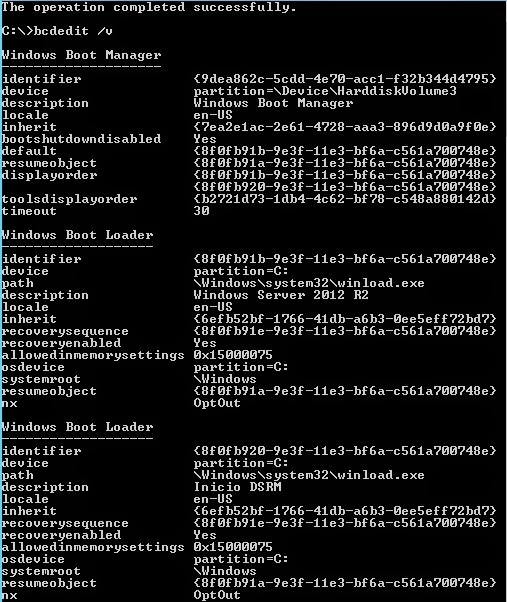


Cuando reiniciemos el servidor aparecerá la nueva opción de inicio Inicio DSRM que seleccionaremos cada vez que necesitemos restaurar el Estado de Sistema.


lunes, 9 de marzo de 2015

MCSA - 70-412 Preparation Guide

Estimados Alumnos, les dejo una guía, que iré actualizando, con los recursos necesarios para preparar el examen de currícula MCSA 70-412 (Configuring Advanced Windows Server 2012 Services).

A estudiar !


Mario Ganem
Microsoft Certified Trainer (MCT)
CompTIA Certified Technical Trainer (CTT+)
Twitter: GMD_vCloud


Exam Objetives

1  Configure and Manage High Availability

1.1   Configure Network Load Balancing (NLB)

·         Network Load Balancing Deployment Guide (TechNet Library)
·         Managing Network Load Balancing Clusters (TechNet Library)
·         Setting Network Load Balancing Parameters (TechNet Library)
·         Network Load Balancing Best Practices (TechNet Library)

1.2   Configure failover clustering

·         Installing the Failover Clustering Feature and Tools (TechNet Library)
·         Cluster-Aware Updating Overview (TechNet Library)
·         Starting with Cluster-Aware Updating: Self-Updating (Blog - Storage Team Blog)
·         Requirements and Best Practices for Cluster-Aware Updating (TechNet Library)
·         Cluster upgrade and migration (TechNet Library)
·         Failover Cluster Deployment Guide (TechNet Library)
·         How to configure VM Monitoring in Windows Server 2012 (Blog - Clustering and High-Availability Blog)
·         Guest Clustering and VM Monitoring in Windows Server 2012 (Session: Steven Ekren @ TechEd North America 2012)

1.3  Manage Virtual Machine (VM) movement

·         Virtual Machine Storage Migration Overview (TechNet Library)
·         Virtual Machine Live Migration Overview (TechNet Library)
·         Windows Server 2012 Storage Migration for Cluster Managed Virtual Machines(Blog - Clustering and High-Availability Blog)

2  Configure File and Storage Solutions

2.1  Configure advanced file services

·         Network File System (TechNet Library)
·         Deploy Network File System (TechNet Library)
·         File Server Resource Manager (TechNet Library)
·         Access Control and Authorization (TechNet Library)

2.2  Implement Dynamic Access Control

·         Dynamic Access Control: Scenario Overview (TechNet Library)
·         Deploy a Central Access Policy (Demonstration Steps) (TechNet Library)
·         Windows Server 2012 Dynamic Access Control Overview (Session: Nir Ben Zvi, Gunjan Jain @ TechEd North America 2012)
·         Windows Server 2012 Dynamic Access Control Deep Dive for Active Directory and Central Authorization Policies (Session: Matthias Wollnik, Siddharth Bhai @ TechEd North America 2012)

2.3  Configure and optimize storage

·         Introduction of iSCSI Target in Windows Server 2012 (Blog - File and Storage Team Blog)
·         Configuring a Highly Available iSCSI Target (Whitepaper)
·         Introduction to iSCSI Diskless Boot Deployment (Whitepaper)
·         iSNS Server Overview (TechNet Library)
·         Thin Provisioning and Trim Storage Overview (TechNet Library)
·         Thin Provisioning in Windows Server 2012 (Whitepaper)
·         Configure Features on Demand in Windows Server (TechNet Library)
·         Implementing Storage Pools and Storage Spaces (TechNet Virtual Lab)

3  Implement Business Continuity and Disaster Recovery

3.1  Configure and manage backups

·         Windows Server Backup Overview  (TechNet Library)
·         Windows Server 2012 and SMB 3.0 – VSS for SMB File Shares (Blog - Jose Barreto's Blog)

3.2  Recover servers

·         Windows Recovery Technical Reference (TechNet Library)
·         Windows Recovery Environment (RE) Explained (Sepago)
·         How to Configure Bare-Metal Restore/Recovery Media (TechNet Library)

3.3  Configure site-level fault tolerance

·         Deploy Hyper-V Replica (TechNet Library)
·         Hyper-V Replica – Prerequisites for certificate based deployments (Blog - Virtualization Blog)
·         Hyper-V Replica Authorization entries–Windows Server 2012 (Blog - Virtualization Blog)
·         Virtual Machine Availability with Hyper-V Replica (Microsoft Virtual Academy)
·         Configure Hyper-V Replica in Windows 8 (Blog - Nathan Lasnoski)

4  Configure Network Services

4.1  Implement an advanced Dynamic Host Configuration Protocol (DHCP) solution

·         Dynamic Host Configuration Protocol (DHCP) Overview (TechNet Library)
·         Step-by-Step: Configure DHCP for Failover  (TechNet Library)
·         Install Dynamic Host Configuration Protocol (DHCP) (TechNet Library)
·         Create and Activate a New DHCP Scope (TechNet Library)
·         Configuring Split Scopes (TechNet Library)
·         Configuring a DHCP Multicast Scope (TechNet Library)
·         Configuring a DHCP Superscope  (TechNet Library)
·         IPv6 Test Lab Extension: Demonstrating DHCPv6 (TechNet Library)

4.2  Implement an advanced DNS solution

·         Step-by-Step: Demonstrate DNSSEC in a Test Lab (TechNet Library)
·         Domain Name System (DNS)  (TechNet Library)

4.3  Deploy and manage IPAM

·         IP Address Management (IPAM) (Microsoft Virtual Academy)

5  Configure the Active Directory Infrastructure

5.1  Configure a forest or a domain

5.2  Configure trusts

·         Active Directory Domains and Trusts (TechNet Library)

5.3  Configure Sites

·         Introduction to Active Directory Replication and Topology Management Using Windows PowerShell (Level 100) (TechNet Library)                         

5.4  Manage Active Directory and SYSVOL replication

·         Active Directory Administrative Center Enhancements (TechNet Library)
·         DFS Replication Improvements in Windows Server 2012 (Blog - Ned Pyle at Storage Team Blog)
·         DFS Replication: Survival Guide (TechNet Wiki)

6  Configure Identity and Access Solutions

6.1  Implement Active Directory Federation Services 2.1 (AD FSv2.1)

·         AD FS Deployment Guide (TechNet Library)

6.2  Install and configure Active Directory Certificate Services (AD CS)

·         Active Directory Certificate Services Overview (TechNet Library)
·         Deploy a private CA with Windows Server 2012 (TechNet Library)

6.3  Manage certificates

·         Active Directory Certificate Services Overview (TechNet Library)

6.4  Install and configure Active Directory Rights Management Services (AD RMS)

·         Active Directory Rights Management Services Overview (TechNet Library)
·         AD RMS Best Practices Guide (TechNet Library)


Prep Materials

Windows Server 2012 Jump Start: Preparing for the Datacenter Evolution

Exam Prep: 70-412 and 70-417 - MCSA: Windows Server 2012

Exam Ref 70-412 Configuring Advanced Windows Server 2012 R2 Services (MCSA)

Technet Virtual Labs